Say it. Settle back.
With a supported Amazon Alexa or Google Assistant connection, operate named shades or launch configured routines by voice. It is especially useful when the windows are high or your hands are full.

SOMFY MOTORIZATION · TAHOMA SMART CONTROL
Enjoy the height. Set the light. Bring your dual shades, roller shades or curtains within easy reach with a Somfy motor system selected for your home.
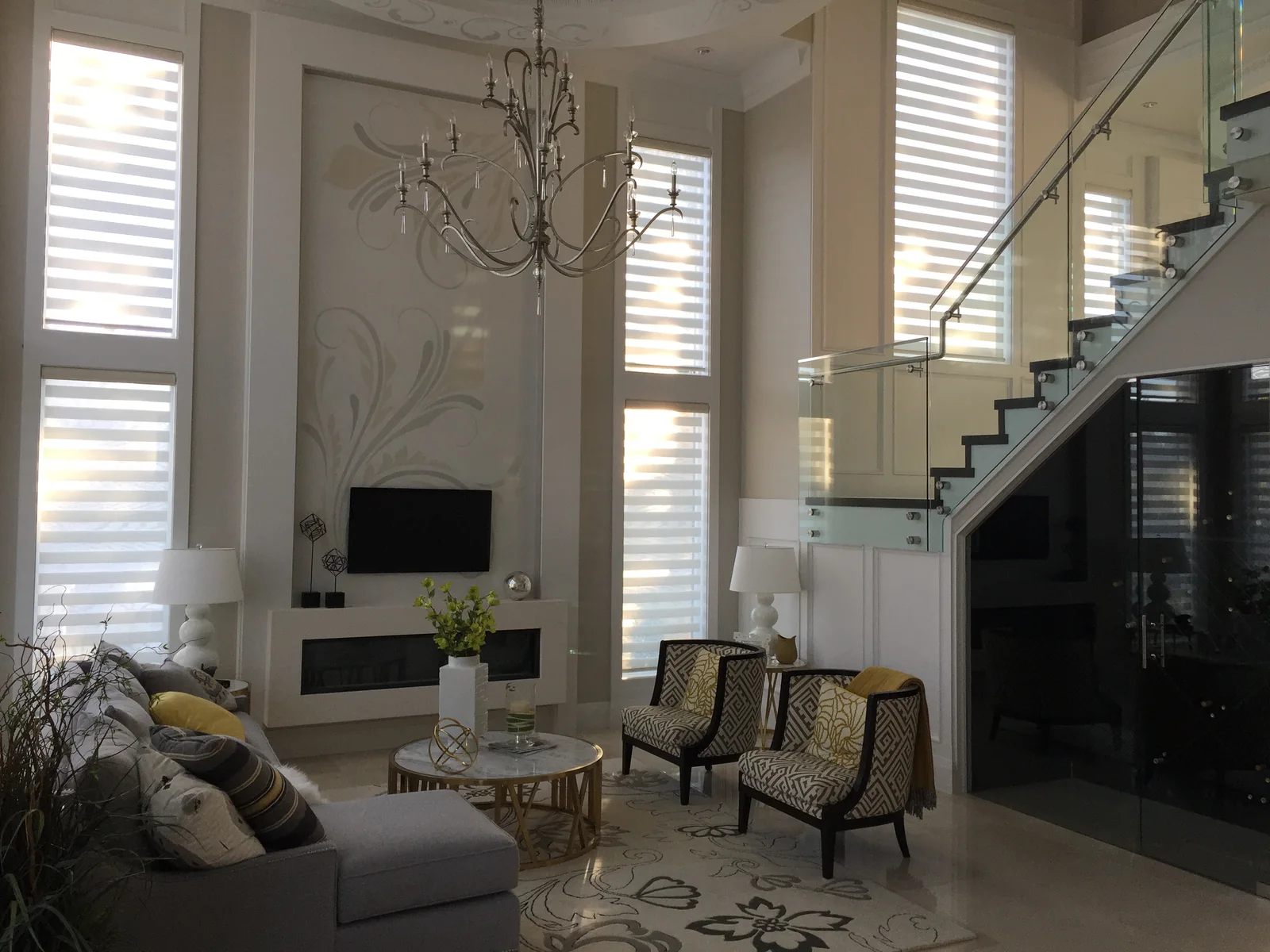
A CONTROL PLAN FOR TALL LIVING SPACES
In this living room, windows rise above the seating area and alongside the staircase. Motorized dual shades bring those high openings into everyday use. Their sheer and opaque bands offer different balances of daylight and privacy.
For a space like this, we can plan compatible Somfy motors with separate upper and lower window groups. Add TaHoma to bring app control, scenes and schedules into the picture — keeping the view you enjoy while adjusting the windows that need shade.
The scene ideas below are options for your new system; they do not describe the photographed home’s installed automation.
ONE ROOM · FOUR MOMENTS
Save a group of shade settings as a TaHoma scene. Run it from the app, assign a schedule, or use a supported voice assistant.
SCENE IDEAS · ILLUSTRATION
Upper windows welcome the morning; lower shades can stay at a preferred privacy position. Choose the settings that suit your room.
Illustrative positions. Fabric, motor and integration determine the available settings. This is not a live device control.
TAHOMA BY SOMFY
With a supported Amazon Alexa or Google Assistant connection, operate named shades or launch configured routines by voice. It is especially useful when the windows are high or your hands are full.
Schedule opening and closing around your day, with sunrise and sunset options that follow the seasons. Keep different routines for rooms with different uses.
Use the TaHoma app to adjust compatible shades at home or while away. A working internet connection and the selected hub are needed for remote access. A compatible local remote remains a convenient everyday option.
FOR A CONNECTED HOME
Planning a custom home or upgrading an existing system? Bring your automation plans early so shade controls can work with the rest of the room.
VOICE & EVERYDAY ROUTINES
Connect compatible Somfy shades through TaHoma. Device names, account linking and supported commands are configured for your chosen assistant.
APPLE HOME & SIRI
Apple Home support requires TaHoma switch and selected compatible Somfy Zigbee motors. RTS motors are not accessible through this Apple Home integration.
CUSTOM HOME AUTOMATION
Supported integrations can bring shades into the same routines as lighting, AV and climate controls. We review motor and hub choices with your home-automation professional; the appropriate driver and programming are part of the plan.
Compatibility depends on the specific motor, TaHoma model, integration and regional availability. Confirm the complete system before ordering.
FIND YOUR PREFERRED LIGHT
Save a comfortable everyday setting instead of choosing only fully open or closed. Supported Zigbee motors allow fine adjustment of the “my” position in TaHoma, useful when setting the band alignment on dual shades.
RTS systems can recall a configured “my” position, but use one-way commands and do not report a verified live position. We select the motor around the level of control you want.
A schedule handles predictable routines. To react to actual sunlight, specify a compatible light sensor or a suitable home-automation control system as well.
TaHoma alone does not measure room brightness. Somfy RTS sun sensors operate with compatible motors separately from TaHoma; other sensor-based routines need their own supported integration. Fabric, window orientation and weather still affect the light you see.
Shade position is not a percentage of room brightness. We help you choose fabric and practical settings for the light, view and privacy you prefer.
PLAN THE DETAILS ONCE
Match a suitable motor to dual shades, roller shades or curtain tracks. Dimensions, fabric weight and the way the covering moves guide the choice.
Compare suitable battery, plug-in and wired options. For tall windows, plan charging access, concealed cable routes and any electrical work before installation.
Decide which windows move together, which need separate control and which scenes you will use. Keep an easy local control alongside the connected features you select.
QUESTIONS WORTH ASKING
Yes, a scene can combine supported actions for selected products. For a tall living room, discuss separate upper and lower groups or different window orientations. Available positions depend on the motors and control system.
Not necessarily. Fabric translucency, band alignment and edge gaps all affect the result. For a dedicated cinema or bedroom, compare a suitable room-darkening or blackout system as part of the design.
We first identify the motors and controls. Compatible Somfy RTS systems may be connected through an appropriate TaHoma hub; Apple Home requires supported Zigbee equipment. Some manual shades need new hardware or replacement before motorization.
Photos or plans, approximate window sizes, nearby power and the name of your smart-home system. Tell us what you want the room to do in the morning, afternoon and evening. Final measurements and compatibility checks complete the specification.
AAA BLINDS · RICHMOND & GREATER VANCOUVER
Tell us about your tall windows, daily routine and preferred controls. We will help you bring the fabric, motor and smart-home plan together.
Explore more: Custom-printed motorized shades for business · Dual shade fabrics
Features checked against Somfy’s North American documentation. Confirm the quoted equipment and integration for your project.
LET’S FIND YOUR WINDOW SOLUTION
Bring your ideas, dimensions or photos. We’ll help you take the next step.